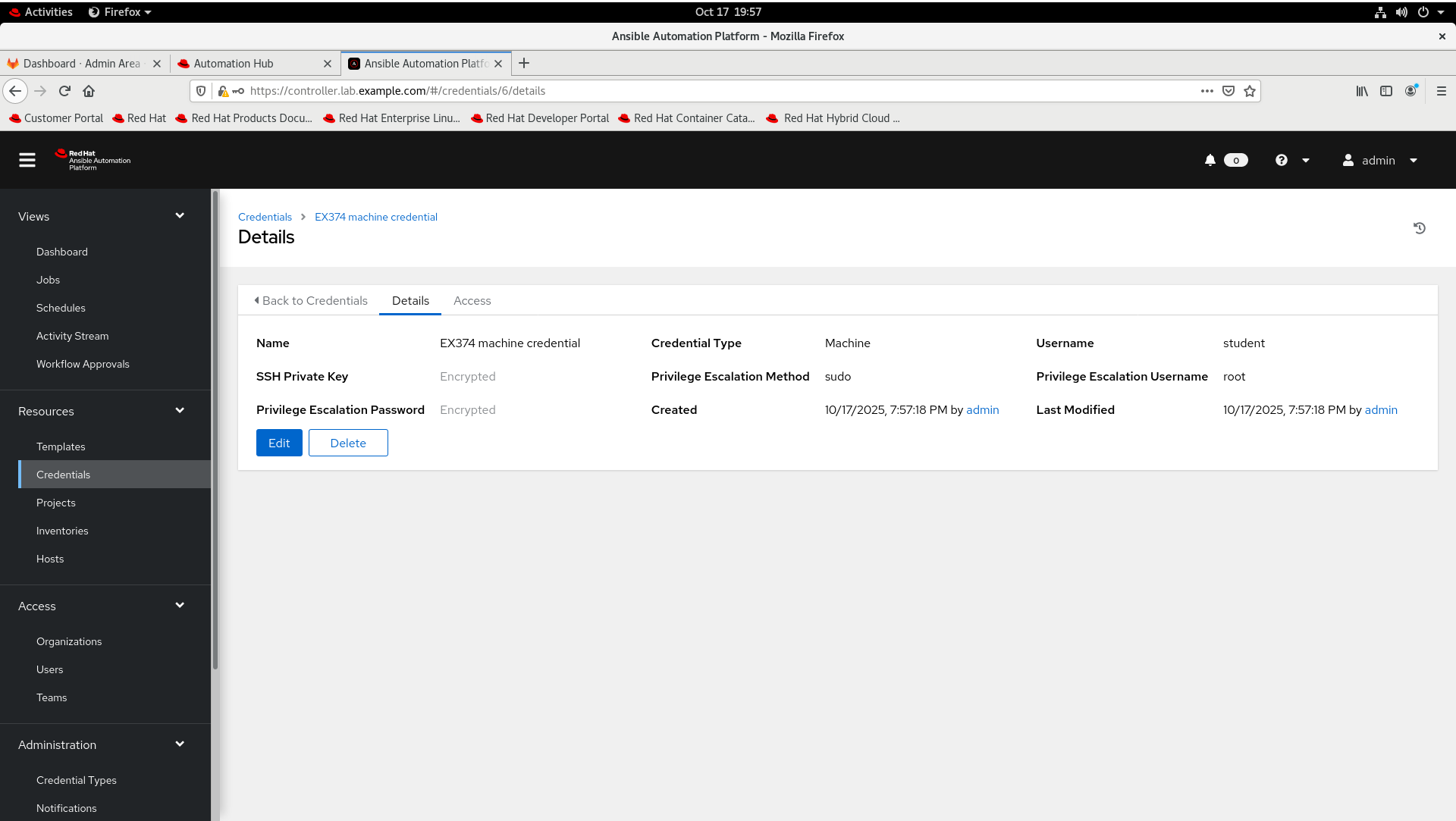
关于练习环境操作前的准备
1. 配置 ~/.ansible-navigator.yml
考试环境需要配置
---
ansible-navigator:
  ansible:
    config:
      path: ./ansible.cfg # 指定 ansible.cfg 配置文件路径为当前目录下的 ./ansible.cfg。
  color:
    osc4: false # 关闭颜色控制序列,避免终端输出颜色异常。
  execution-environment:
    image: hub.lab.example.com/ee-supported-rhel8:latest
    pull:
      policy: missing # 指定执行环境镜像为私有仓库,拉取策略是 missing(本地不存在时才拉取,避免每次都强制更新)。

  mode: stdout # ansible-navigator 运行时采用 stdout 模式,直接在终端输出执行结果,而不是进入 TUI 界面。

  logging:
    file: /dev/null # 日志输出被丢弃(写到 /dev/null),不会保存日志文件。

  playbook-artifact:
    enable: false # 禁止生成 playbook 执行产物(artifact)。
2. 配置 ~/.vimrc
写配置文件更美观更直观
set ai
set ts=2 sw=2 et
ser cursorcolumn
System Information
Account Information
User account student has been created on the Ansible control node(workstation.lab.example.com) and other all nodes. You can access the account using ssh [email protected] . This account has SSH keys preinstalled to allow login between the Ansible control node and each of the Ansible managed nodes. A default ansible-navigator configuration has been set up for student on the Ansible control node as ~student/.ansible-navigator.yml .
Execution Environments
Unless otherwise specified, all playbooks are to run in the ee-supportedrhel8:latest execution environment. Unless otherwise specified,all templates launched in controller are to launch in the ee-supported-rhel8:latest execution environment.
Ansible automation controller
Use account admin and password redhat to access https://controller.lab.example.com web UI.
Ansible Hub
Use account admin and password redhat to access https://hub.lab.example.com web UI.
Git
Git repository has been configured on https://git.lab.example.com . You can use account student and password Student@123 to accedd web UI. Unless otherwise specified, all of your work on the Ansible control node should be pushed to the Git repository for that item.
Additional Information
The firewall on all systems has been enabled by default and SELinux is in Enforcing mode.
练习题-workstation
第一题:Configure Git for a user
考题
Configure Git on workstation.lab.example.com for user student
Git user name:
studentGit user email:
[email protected]Pefault push method:
simpleDo not make any other changes other than those lited above.
答案
点击展开
(DO374-RHAPP2)kiosk@foundation0:~$ ssh workstation.lab.example.com -lstudent
[student@workstation ~]$ cd ~
[student@workstation ~]$ git config --global user.name student
[student@workstation ~]$ git config --global user.email [email protected]
[student@workstation ~]$ git config --global push.default simple
[student@workstation ~]$ git config --global -l
user.name=student
[email protected]
push.default=simple
[student@workstation ~]$
第二题:Create user
考题
The Git project create_users can be found at
https://git.lab.example.com/student/create_users.gitThe project contains a playbook called create_user.yml that is used to create user.Update the project so that:
User bob is in the developer group
Host serverc is in the dev group
Commit and push any changes back to the repository
Do not make any other changes other than those lited above.
答案
点击展开
[student@workstation httpd_alias]$ podman login hub.lab.example.com
Username: admin
Password: redhat
Login Succeeded!
[student@workstation ~]$ git clone https://git.lab.example.com/student/create_users.git
Cloning into 'create_users'...
Username for 'https://git.lab.example.com': student
Password for 'https://[email protected]':
remote: Enumerating objects: 11, done.
remote: Total 11 (delta 0), reused 0 (delta 0), pack-reused 11
Receiving objects: 100% (11/11), done.
Resolving deltas: 100% (2/2), done.
[student@workstation ~]$ ls -lh
total 4.0K
drwxr-xr-x. 3 student student   99 Aug 13 00:34 create_users
[student@workstation ~]$ cd create_users/
[student@workstation create_users]$ ls -lh
total 16K
-rw-r--r--. 1 student student 226 Aug 13 00:34 ansible.cfg
-rw-r--r--. 1 student student 566 Aug 13 00:34 create_users.yml
-rw-r--r--. 1 student student  29 Aug 13 00:34 inventory
-rw-r--r--. 1 student student 115 Aug 13 00:34 user_list.yml
[student@workstation create_users]$ cat inventory
[dev]
servera
[prod]
serverb
[student@workstation create_users]$ vim inventory
[student@workstation create_users]$ cat inventory
[dev]
servera
serverc # 添加的信息
[prod]
serverb
[student@workstation create_users]$ cat user_list.yml
users:
  - name: sally
    group: developer
  - name: fred
    group: manager
  - name: david
    group: developer
[student@workstation create_users]$ vim user_list.yml
[student@workstation create_users]$ cat user_list.yml
users:
  - name: sally
    group: developer
  - name: fred
    group: manager
  - name: david
    group: developer
  - name: bob         # 添加的内容
    group: developer  # 添加的内容
[student@workstation create_users]$
[student@workstation create_users]$ git add .
[student@workstation create_users]$ git commit -m 'update create_users project'
[master 2b5a364] update create_users project
 3 files changed, 6 insertions(+)
 create mode 100644 .ssh/known_hosts
[student@workstation create_users]$ git push
Enumerating objects: 9, done.
Counting objects: 100% (9/9), done.
Delta compression using up to 4 threads
Compressing objects: 100% (4/4), done.
Writing objects: 100% (6/6), 726 bytes | 726.00 KiB/s, done.
Total 6 (delta 1), reused 0 (delta 0), pack-reused 0
To https://git.lab.example.com/student/create_users.git
   d9ee890..2b5a364  master -> master
[student@workstation create_users]$
第三题:Manage a web server
考题
The Gir projecrt at a
https://git.lab.example.com/student/httpd_alias.gitcontains a playbook that updates a web server configuration. Update this project so that:
When the playbook is run th alias specified in the playbook is added to the web server and the web service is restarted
If the alias already exists on the web service when the playbook is run the web service is not restarted
Commit and push any changes back to the repository
Do not make any other changes other than those lited above.
答案
点击展开
[student@workstation ~]$ git clone https://git.lab.example.com/student/httpd_alias.git
[student@workstation ~]$ cd httpd_alias/
[student@workstation httpd_alias]$ cat install_httpd_alias.yml
---
- name: Add Apache alias
  hosts: prod
  become: yes

  tasks:
    - name: copy alias file
      copy:
        src: alias.conf
        dest: /etc/httpd/conf.d
# 新编辑
      notify: restart httpd service
  handlers:
    - name: enabled httpd alias
      ansible.builtin.service:
        name: httpd
        state: restarted
        enabled: yes
      listen: restart httpd service
[student@workstation httpd_alias]$
[student@workstation httpd_alias]$ ansible-navigator run install_httpd_alias.yml
--------------------------------------------------------------------------------
Execution environment image and pull policy overview
--------------------------------------------------------------------------------
Execution environment image name:  hub.lab.example.com/ee-supported-rhel8:latest
Execution environment image tag:   latest
Execution environment pull policy: tag
Execution environment pull needed: True
--------------------------------------------------------------------------------
Updating the execution environment
--------------------------------------------------------------------------------
Trying to pull hub.lab.example.com/ee-supported-rhel8:latest...
Getting image source signatures
Copying blob 80be453030cf done
Copying blob d322672cc56a done
Copying blob 00fe5380b165 done
Copying blob 5c4402ce71c4 done
Copying blob 69ebc448681d done
Copying config 00aa4b51e9 done
Writing manifest to image destination
Storing signatures
00aa4b51e90f57d6fe20d7b1a6d36b9122b3dce0b6124aea58b931fda4fdab23

PLAY [Add Apache alias] **********************************************************************************************************************************************************************

TASK [Gathering Facts] ***********************************************************************************************************************************************************************
ok: [serverb]

TASK [copy alias file] ***********************************************************************************************************************************************************************
changed: [serverb]

RUNNING HANDLER [enabled httpd alias] ********************************************************************************************************************************************************
changed: [serverb]

PLAY RECAP ***********************************************************************************************************************************************************************************
serverb                    : ok=3    changed=2    unreachable=0    failed=0    skipped=0    rescued=0    ignored=0

[student@workstation httpd_alias]$
[student@workstation httpd_alias]$ ansible-navigator run install_httpd_alias.yml
[student@workstation httpd_alias]$ git add .
[student@workstation httpd_alias]$ git commit -m 'Update httpd_alias project'
[student@workstation httpd_alias]$ git push
第四题:Manage web content
考题
The dev web server is being used for testing web content before deployment to production. The Git project manage_content contains a partially completed playbook manage_content.yml for managing the content of the dev web server. Complete the playbook manage_content.yml in the Git repository
https://git.lab.example.com/student/manage_content.gitso that:
When the playbook is run with the tag alpha it generates and deploys the content: Que Sera, Sera in /var/www/html/index.html on the dev hosts
When the playbook is run with the tag beta it generates and deploys the content: Whatever will be, will be in /var/www/html/index.html on the dev hosts
If the playbook is run with neither of the above tags, then the playbook does not generate nor deploy any content
Commit and push any changes back to the repository
Do not make any other changes other than those lited above.
答案
点击展开
[student@workstation ~]$ git clone https://git.lab.example.com/student/manage_content.git
Cloning into 'manage_content'...
remote: Enumerating objects: 9, done.
remote: Total 9 (delta 0), reused 0 (delta 0), pack-reused 9
Unpacking objects: 100% (9/9), 865 bytes | 432.00 KiB/s, done.
[student@workstation ~]$ cd manage_content/
[student@workstation manage_content]$ ls -lg
total 12
-rw-rw-r--. 1 student 225 Sep  2 03:08 ansible.cfg
-rw-rw-r--. 1 student  29 Sep  2 03:08 inventory
-rw-rw-r--. 1 student  55 Sep  2 03:08 manage_content.yml
[student@workstation manage_content]$ vim manage_content.yml
[student@workstation manage_content]$ cat manage_content.yml
---
- name: Deploy content
  hosts: dev
  become: yes

  tasks:
    - name: insert new line into index.html for alpha tag
      ansible.builtin.copy:
        content: Que Sera, Sera
        dest: /var/www/html/index.html
      tags:
        - alpha
        - never

    - name: insert new line into index.html for beta tag
      ansible.builtin.copy:
        content: Whatever will be, will be
        dest: /var/www/html/index.html
      tags:
        - beta
        - never

[student@workstation manage_content]$
[student@workstation manage_content]$ ansible-navigator run manage_content.yml
PLAY [Deploy content] ************************************************************************************************************************************************************************

TASK [Gathering Facts] ***********************************************************************************************************************************************************************
ok: [servera]

PLAY RECAP ***********************************************************************************************************************************************************************************
servera                    : ok=1    changed=0    unreachable=0    failed=0    skipped=0    rescued=0    ignored=0

[student@workstation manage_content]$ ansible-navigator run manage_content.yml --tags alpha
PLAY [Deploy content] ************************************************************************************************************************************************************************

TASK [Gathering Facts] ***********************************************************************************************************************************************************************
ok: [servera]

TASK [insert new line into index.html for alpha tag] *****************************************************************************************************************************************
changed: [servera]

PLAY RECAP ***********************************************************************************************************************************************************************************
servera                    : ok=2    changed=1    unreachable=0    failed=0    skipped=0    rescued=0    ignored=0

[student@workstation manage_content]$ curl http://servera; echo
Que Sera, Sera
[student@workstation manage_content]$ ansible-navigator run manage_content.yml --tags beta
PLAY [Deploy content] ************************************************************************************************************************************************************************

TASK [Gathering Facts] ***********************************************************************************************************************************************************************
ok: [servera]

TASK [insert new line into index.html for beta tag] ******************************************************************************************************************************************
changed: [servera]

PLAY RECAP ***********************************************************************************************************************************************************************************
servera                    : ok=2    changed=1    unreachable=0    failed=0    skipped=0    rescued=0    ignored=0

[student@workstation manage_content]$ curl http://servera; echo
Whatever will be, will be
[student@workstation manage_content]$
[student@workstation manage_content]$ git add .
[student@workstation manage_content]$ git commit -m 'Update manage_content project'
[master 3fbf715] Update manage_content project
 2 files changed, 18 insertions(+)
 create mode 100644 .ssh/known_hosts
[student@workstation manage_content]$ git push
Enumerating objects: 7, done.
Counting objects: 100% (7/7), done.
Delta compression using up to 4 threads
Compressing objects: 100% (4/4), done.
Writing objects: 100% (5/5), 779 bytes | 779.00 KiB/s, done.
Total 5 (delta 0), reused 0 (delta 0), pack-reused 0
To https://git.lab.example.com/student/manage_content.git
   1f327d2..3fbf715  master -> master
[student@workstation manage_content]$
第五题:Tune Ansible
考题
Update the Ansible configuration in Git repository located at
https://git.lab.example.com/student/tune_ansible.gitso that:
The gathering of facts is disabled by default
The maximum number of simultaneous host connections is 25
Commit and push any changes back to the repository
Do not make any other changes other than those lited above.
答案
点击展开
[student@workstation ~]$ git clone https://git.lab.example.com/student/tune_ansible.git
Cloning into 'tune_ansible'...
remote: Enumerating objects: 8, done.
remote: Total 8 (delta 0), reused 0 (delta 0), pack-reused 8
Unpacking objects: 100% (8/8), 719 bytes | 359.00 KiB/s, done.
[student@workstation ~]$ cd tune_ansible/
[student@workstation tune_ansible]$ ls -lg
total 8
-rw-rw-r--. 1 student 225 Sep  2 22:55 ansible.cfg
-rw-rw-r--. 1 student  29 Sep  2 22:55 inventory
[student@workstation tune_ansible]$ vim ansible.cfg
[student@workstation tune_ansible]$ cat ansible.cfg
[defaults]
collections_paths = /home/student/mycollections
inventory = ./inventory
remote_user = student
ask_pass = false
# 新增内容
gathering = explicit
forks = 25

[privilege_escalation]
become = false
become_method = sudo
become_user = root
become_ask_pass = false
[student@workstation tune_ansible]$
[student@workstation tune_ansible]$ git add .
[student@workstation tune_ansible]$ git commit -m 'Update tune_ansible project'
[master 9242d29] Update tune_ansible project
 1 file changed, 2 insertions(+)
[student@workstation tune_ansible]$ git push
Enumerating objects: 5, done.
Counting objects: 100% (5/5), done.
Delta compression using up to 4 threads
Compressing objects: 100% (3/3), done.
Writing objects: 100% (3/3), 361 bytes | 361.00 KiB/s, done.
Total 3 (delta 1), reused 0 (delta 0), pack-reused 0
To https://git.lab.example.com/student/tune_ansible.git
   3cdc3fb..9242d29  master -> master
[student@workstation tune_ansible]$
第六题:Create user from a list
考题
Use the Git repository at
https://git.lab.example.com/student/create_users_complex.gitto complete the following item.The repository contains the following resources:
user_information.yml - a list of user accounts. This file has multiple fields:
The name field specifies the username/login ID for the user account
The first field specifies the first name of the user
The middle field specifies the middle name of the user
The last field specifies the last name of the user
The uid field specifies the associated user ID for the account
inventory - the hosts associated with this task Do not make any changes to these files.
Create a playbook that uses the files listed above and does the following:
The playbook is named manage_accounts.yml
When run on the hosts listed in the supplied inventory file the playbook creates the user accounts listed in user_information.yml with the specified user ID.
For each account the playbook generate a random six digit password as follows:
The password is encrypted using the SHA-512 password hash
The plain text version of the password and the salt used to generate the password is stored in a file named
password-<name>where<name>is the username associated with the account. E.g. for the user 'frederick' the password and salt are stored in the file password-frederickThe playbook generates the
password-<name>file(s) into the same directory in which the playbook was runFor each account, the user comment (GECOS) field is set to the proper name of the user in the format: First Middle Last with a single space before and after the middle name.
Each component of the proper name must be capitalized as shown above.
Commit and push any changes back to the repository
答案
点击展开
[student@workstation ~]$ git clone https://git.lab.example.com/student/create_users_complex.git
Cloning into 'create_users_complex'...
remote: Enumerating objects: 9, done.
remote: Total 9 (delta 0), reused 0 (delta 0), pack-reused 9
Unpacking objects: 100% (9/9), 957 bytes | 319.00 KiB/s, done.
[student@workstation ~]$ cd create_users_complex/
[student@workstation create_users_complex]$ ls -lh
total 12K
-rw-rw-r--. 1 student student 226 Sep  2 23:12 ansible.cfg
-rw-rw-r--. 1 student student  37 Sep  2 23:12 inventory
-rw-rw-r--. 1 student student 290 Sep  2 23:12 user_information.yml
[student@workstation create_users_complex]$ cat user_information.yml
users:
  - name:   bach
    first:  johann
    middle: sebastian
    last:   bach
    uid:    2000
  - name:   handel
    first:  george
    middle: frideric
    last:   handel
    uid:    2001
  - name:   mozart
    first:  wolfgang
    middle: amadeus
    last:   mozart
    uid:    2002
[student@workstation create_users_complex]$ vim manage_accounts.yml # 新增文件
[student@workstation create_users_complex]$ cat manage_accounts.yml
---
- name: user complex user list to create user
  hosts: dev,prod
  become: true
  vars_files:
    - user_information.yml

  tasks:
    - name: create user from user_information file
      ansible.builtin.user:
        name: "{{ item.name }}"
        uid: "{{ item.uid }}"
        comment: "{{ item.first | capitalize }} {{ item.middle | capitalize }} {{ item.last | capitalize }}"
        password: "{{ lookup('password', 'password-{{ item.name }} chars=digits length=6') | password_hash('sha512') }}"
# lookup 找密码,chars 定规则,length 定长度,最后做哈希
      loop: "{{ users }}"
[student@workstation create_users_complex]$
[student@workstation create_users_complex]$ ansible-navigator run manage_accounts.yml
PLAY [user complex user list to create user] *************************************************************************************************************************************************

TASK [Gathering Facts] ***********************************************************************************************************************************************************************
ok: [servera]
ok: [serverb]
ok: [serverc]

TASK [create user from user_information file] ************************************************************************************************************************************************
changed: [serverb] => (item={'name': 'bach', 'first': 'johann', 'middle': 'sebastian', 'last': 'bach', 'uid': 2000})
changed: [serverc] => (item={'name': 'bach', 'first': 'johann', 'middle': 'sebastian', 'last': 'bach', 'uid': 2000})
changed: [servera] => (item={'name': 'bach', 'first': 'johann', 'middle': 'sebastian', 'last': 'bach', 'uid': 2000})
changed: [serverc] => (item={'name': 'handel', 'first': 'george', 'middle': 'frideric', 'last': 'handel', 'uid': 2001})
changed: [serverb] => (item={'name': 'handel', 'first': 'george', 'middle': 'frideric', 'last': 'handel', 'uid': 2001})
changed: [servera] => (item={'name': 'handel', 'first': 'george', 'middle': 'frideric', 'last': 'handel', 'uid': 2001})
changed: [serverb] => (item={'name': 'mozart', 'first': 'wolfgang', 'middle': 'amadeus', 'last': 'mozart', 'uid': 2002})
changed: [serverc] => (item={'name': 'mozart', 'first': 'wolfgang', 'middle': 'amadeus', 'last': 'mozart', 'uid': 2002})
changed: [servera] => (item={'name': 'mozart', 'first': 'wolfgang', 'middle': 'amadeus', 'last': 'mozart', 'uid': 2002})

PLAY RECAP ***********************************************************************************************************************************************************************************
servera                    : ok=2    changed=1    unreachable=0    failed=0    skipped=0    rescued=0    ignored=0
serverb                    : ok=2    changed=1    unreachable=0    failed=0    skipped=0    rescued=0    ignored=0
serverc                    : ok=2    changed=1    unreachable=0    failed=0    skipped=0    rescued=0    ignored=0

[student@workstation create_users_complex]$ ls -lh
total 28K
-rw-rw-r--. 1 student student 226 Sep  2 23:12 ansible.cfg
-rw-rw-r--. 1 student student  37 Sep  2 23:12 inventory
-rw-rw-r--. 1 student student 530 Sep  2 23:24 manage_accounts.yml
-rw-------. 1 student student   7 Sep  2 23:29 password-bach
-rw-------. 1 student student   7 Sep  2 23:29 password-handel
-rw-------. 1 student student   7 Sep  2 23:29 password-mozart
-rw-rw-r--. 1 student student 290 Sep  2 23:12 user_information.yml
[student@workstation create_users_complex]$
[student@workstation create_users_complex]$ git add .
[student@workstation create_users_complex]$ git commit -m 'Update create_users_complex project'
[master 52a788c] Update create_users_complex project
 5 files changed, 20 insertions(+)
 create mode 100644 .ssh/known_hosts
 create mode 100644 manage_accounts.yml
 create mode 100644 password-bach
 create mode 100644 password-handel
 create mode 100644 password-mozart
[student@workstation create_users_complex]$ git push
Enumerating objects: 9, done.
Counting objects: 100% (9/9), done.
Delta compression using up to 4 threads
Compressing objects: 100% (4/4), done.
Writing objects: 100% (8/8), 1.04 KiB | 1.04 MiB/s, done.
Total 8 (delta 0), reused 0 (delta 0), pack-reused 0
To https://git.lab.example.com/student/create_users_complex.git
   9262198..52a788c  master -> master
[student@workstation create_users_complex]$
第七题:Install a Collection
考题
Install the conection newswangerd.collection_demo avaliable from hub.lab.example.com on workstation as the user student. The collection should be installed in /home/student/mycollections
考试的时候:
1. desktop 用户打开 firefox
2. 将 tarball 包 scp 同步到workstation节点即可
答案
点击展开
[student@workstation ~]$ pwd
/home/student
[student@workstation ~]$ ls -lh
total 292K
-rw-rw-r--.  1 student student  226 Sep 12 03:53 ansible.cfg
drwxrwxr-x.  3 student student   99 Aug 29 04:27 create_users
drwxrwxr-x.  4 student student  188 Sep  2 23:29 create_users_complex
drwxr-xr-x.  2 student student    6 Jan 13  2022 Desktop
drwxr-xr-x.  2 student student    6 Jan 13  2022 Documents
drwxr-xr-x.  2 student student    6 Jan 13  2022 Downloads
drwxrwxr-x.  4 student student  115 Sep  1 23:01 httpd_alias
drwxrwxr-x.  4 student student   92 Sep  2 03:11 manage_content
drwxrwxr-x.  3 student student   18 Jul 27 19:08 Monitoring
drwxr-xr-x.  2 student student    6 Jan 13  2022 Music
drwxrwxr-x.  2 student student   30 Sep 12 03:54 mycollections
-rw-r--r--.  1 student student 281K Sep 12 03:56 newswangerd-collection_demo-1.0.11.tar.gz
drwxr-xr-x.  2 student student    6 Jan 13  2022 Pictures
drwxr-xr-x.  2 student student    6 Jan 13  2022 Public
drwxr-xr-x.  2 student student    6 Jan 13  2022 Templates
drwxrwxr-x.  3 student student   54 Sep  2 22:59 tune_ansible
drwxr-xr-x.  2 student student    6 Jan 13  2022 Videos
[student@workstation ~]$ cp create_users/ansible.cfg .
[student@workstation ~]$ vim ansible.cfg
[student@workstation ~]$ cat ansible.cfg
[defaults]
collections_paths = /home/student/mycollections
inventory = ./inventory
remote_user = student
ask_pass = false

[privilege_escalation]
become = false
become_method = sudo
become_user = root
become_ask_pass = false
[student@workstation ~]$ mkdir /home/student/mycollections
[student@workstation ~]$ vim mycollections/requirements.yml
[student@workstation ~]$ cat mycollections/requirements.yml
---
collections:
  - name: /home/student/newswangerd-collection_demo-1.0.11.tar.gz
[student@workstation ~]$
[student@workstation ~]$  ansible-galaxy collection install -r mycollections/requirements.yml -p ./mycollections/
Starting galaxy collection install process
Process install dependency map
Starting collection install process
Installing 'newswangerd.collection_demo:1.0.11' to '/home/student/mycollections/ansible_collections/newswangerd/collection_demo'
newswangerd.collection_demo:1.0.11 was installed successfully
[student@workstation ~]$
[student@workstation ~]$ ls -lh mycollections/ansible_collections/newswangerd/collection_demo/
total 20K
drwxr-xr-x. 2 student student   44 Sep 12 05:10 docs
-rw-r--r--. 1 student student 5.2K Sep 12 05:10 FILES.json
-rw-r--r--. 1 student student  723 Sep 12 05:10 MANIFEST.json
drwxr-xr-x. 2 student student   25 Sep 12 05:10 meta
drwxr-xr-x. 3 student student   21 Sep 12 05:10 plugins
-rw-r--r--. 1 student student  717 Sep 12 05:10 README.md
drwxr-xr-x. 2 student student 4.0K Sep 12 05:10 releases
drwxr-xr-x. 4 student student   36 Sep 12 05:10 roles
[student@workstation ~]$
[student@workstation ~]$ tree mycollections/
mycollections/
├── ansible_collections
│   └── newswangerd
│       └── collection_demo
│           ├── docs
│           │   └── test_guide.md
│           ├── FILES.json
│           ├── MANIFEST.json
│           ├── meta
│           │   └── runtime.yml
│           ├── plugins
│           │   └── modules
│           │       └── real_facts.py
│           ├── README.md
│           ├── releases
│           │   ├── newswangerd-collection_demo-1.0.0.tar.gz
│           │   ├── newswangerd-collection_demo-1.0.1.tar.gz
│           │   ├── newswangerd-collection_demo-1.0.2.tar.gz
│           │   ├── newswangerd-collection_demo-1.0.3.tar.gz
│           │   ├── newswangerd-collection_demo-1.0.4.tar.gz
│           │   └── newswangerd-collection_demo-1.0.5.tar.gz
│           └── roles
│               ├── deltoid
│               │   ├── meta
│               │   │   └── main.yaml
│               │   ├── README.md
│               │   └── tasks
│               │       └── main.yml
│               └── factoid
│                   ├── meta
│                   │   └── main.yaml
│                   ├── README.md
│                   └── tasks
│                       └── main.yml
└── requirements.yml

15 directories, 19 files
[student@workstation ~]$
第八题:Create a Custom Collection
考题
Use the Git repository at
https://git.lab.example.com/student/custom_collection.gitto complete the following item. The repository contains the following resources:
tasks_main.yml
users.conf Do not make any changes to these files.
Create a custom collection on workstation that meets the following requirements:
The collection contains is named rhel.user
The collection contains a role named newuser
The file tasks_main.yml is stored as roles/newuser/tasks/main.yml
The file users.conf is stored as roles/newuser/files/users.conf
Upload the collection rhel.user to hub.lab.example.com under the namespace rhel
(If the collection does not appear on your content hub and you have followed the correct procedure, increment the version of the collection and upload it again.)
答案
点击展开
[student@workstation ~]$ git clone https://git.lab.example.com/student/custom_collection.git
Cloning into 'custom_collection'...
remote: Enumerating objects: 4, done.
remote: Total 4 (delta 0), reused 0 (delta 0), pack-reused 4
Unpacking objects: 100% (4/4), 431 bytes | 431.00 KiB/s, done.
[student@workstation ~]$
[student@workstation ~]$ cd custom_collection/
[student@workstation custom_collection]$ ls -lg
total 8
-rw-rw-r--. 1 student 232 Sep 13 12:49 tasks_main.yml
-rw-rw-r--. 1 student  54 Sep 13 12:49 users.conf
[student@workstation custom_collection]$
[student@workstation custom_collection]$ ansible-galaxy collection init rhel.user
- Collection rhel.user was created successfully
[student@workstation custom_collection]$ cd rhel/user/roles/
[student@workstation roles]$ ansible-galaxy role init newuser
- Role newuser was created successfully
[student@workstation roles]$ cd ../../../
[student@workstation custom_collection]$ tree .
.
├── rhel
│   └── user
│       ├── docs
│       ├── galaxy.yml
│       ├── plugins
│       │   └── README.md
│       ├── README.md
│       └── roles
│           └── newuser
│               ├── defaults
│               │   └── main.yml
│               ├── files
│               ├── handlers
│               │   └── main.yml
│               ├── meta
│               │   └── main.yml
│               ├── README.md
│               ├── tasks
│               │   └── main.yml
│               ├── templates
│               ├── tests
│               │   ├── inventory
│               │   └── test.yml
│               └── vars
│                   └── main.yml
├── tasks_main.yml
└── users.conf

14 directories, 13 files
[student@workstation custom_collection]$
[student@workstation custom_collection]$ cp tasks_main.yml rhel/user/roles/newuser/tasks/main.yml
[student@workstation custom_collection]$ cp users.conf rhel/user/roles/newuser/files/users.conf
[student@workstation custom_collection]$ cd rhel/user/
[student@workstation user]$ mkdir meta
[student@workstation user]$ vim meta/runtime.yml
# must create it
[student@workstation user]$ cat meta/runtime.yml
---
requires_ansible: '>=2.9.10'
[student@workstation user]$
[student@workstation user]$ ansible-galaxy collection build
Created collection for rhel.user at /home/student/custom_collection/rhel/user/rhel-user-1.0.0.tar.gz
[student@workstation user]$
[student@workstation user]$ ls -lh /home/student/custom_collection/rhel/user/rhel-user-1.0.0.tar.gz
-rw-rw-r--. 1 student student 4.5K Sep 13 12:55 /home/student/custom_collection/rhel/user/rhel-user-1.0.0.tar.gz
[student@workstation user]$ logout
Connection to workstation closed.
(DO374-RHAPP2)kiosk@foundation0:~$ scp student@workstation:/home/student/custom_collection/rhel/user/rhel-user-1.0.0.tar.gz /home/kiosk/Downloads/
rhel-user-1.0.0.tar.gz                                                                                                                                      100% 4526     3.1MB/s   00:00
(DO374-RHAPP2)kiosk@foundation0:~$

# 考试的时候,在desktop主机,执行scp命令,将rhel-user-1.0.0.tar.gz拷贝到desktop主机,然后打开浏览器,上传。
[desksotp@desktop ~]$ scp sysadmin@control:/home/sysamdin/custom_collection/rhel/user/rhel-user-1.0.0.tar.gz ~/Downloads/

# firefox(考试的时候,也要把在workstation上,ansible-galaxy collection build后的rhel-user-1.0.0.tar.gz 拷贝到desktop主机,然后打开desktop上浏览器,上传到rhel namespace中)
 1. Collections > Namespaces > 'View collections' under rhel > 'Upload collection' > 'Select file' > Downloads - rhel-user-1.0.0.tar.gz > Upload > waiting rhel.user Completed > Approval > Approve(上传完成要点击approve批准)
 2. Collections > Namespaces > 'View collections' under rhel > user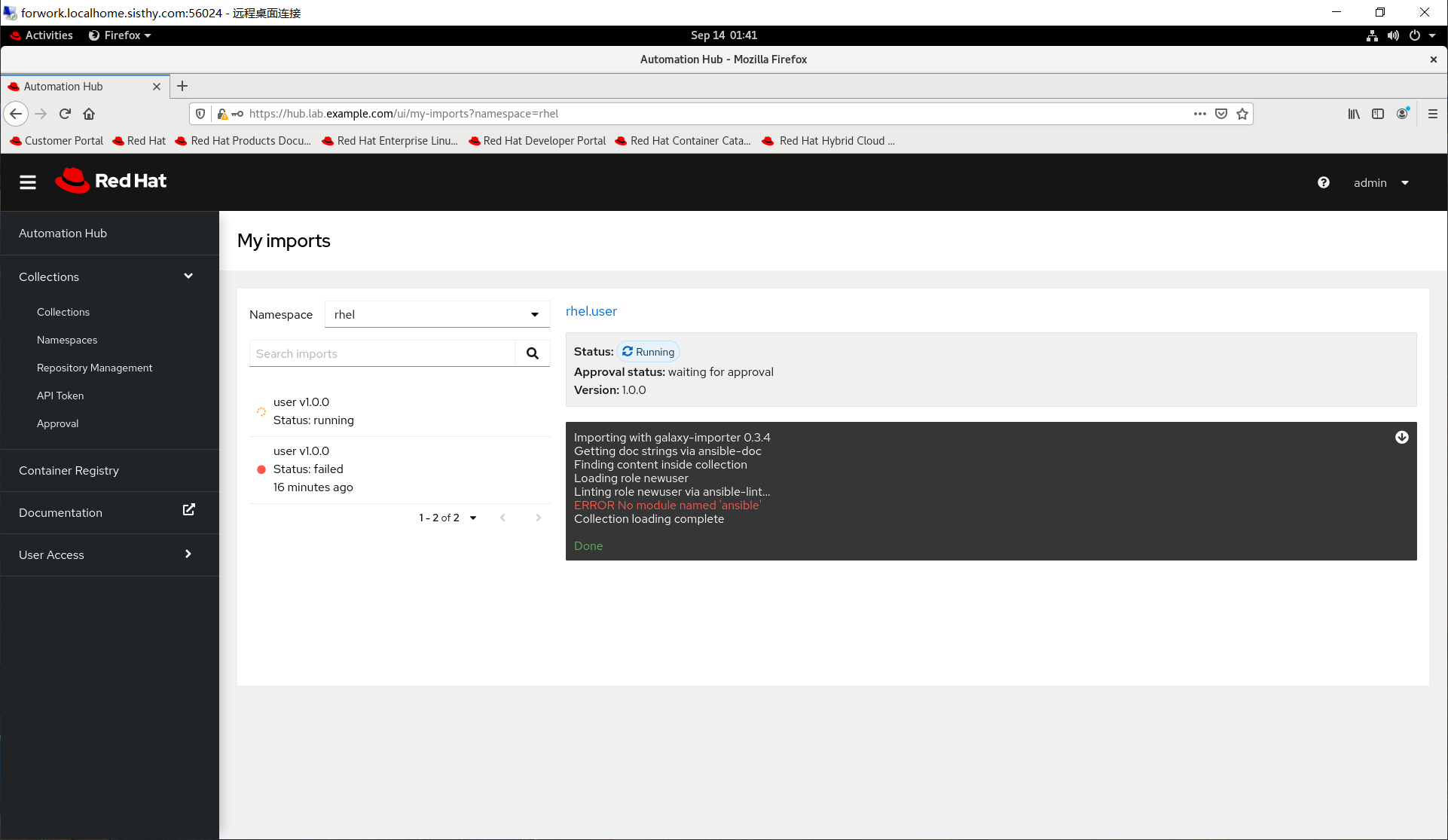
第九题:Build a custom execution environment
考题:
Create a custom execution environment that meets the following requirements:
The exection environment is named ee-user-supported:2.2
The execution environment uses ee-supported-rhel8:exercise as the base image
The execution environment uses ansible-builder-rhel8:exercise as the builder image
The execution environment inccludes the customized collection rhel.user that was created in a previous item Upload the newly created execution environment to hub.lab.example.com
练习与考试区别
修改 context/Containerfile 文件
练习环境需要修改
sed -i '/WORKDIR \/build/a RUN sed -i -e "s|rhgls.sector1.example.com|content.example.com/rhel8.6/x86_64/dvd|g" /etc/yum.repos.d/ubi.repo \&\& sed -i -e "s|rhgls.sector1.example.com|content.example.com|g" /etc/pip.conf' context/Containerfile
sed -i '/COPY --from=galaxy \/usr\/share\/ansible \/usr\/share\/ansible/a RUN sed -i -e "s|rhgls.sector1.example.com|content.example.com/rhel8.6/x86_64/dvd|g" /etc/yum.repos.d/ubi.repo \&\& sed -i -e "s|rhgls.sector1.example.com|content.example.com|g" /etc/pip.conf' context/Containerfile
考试环境无需修改
生成容器镜像
练习环境需要使用 podman 命令且指定文件后生成镜像
考试环境使用 ansible-build 生成镜像
答案
点击展开
测试环境
[student@workstation ~]$ podman login hub.lab.example.com
Username: admin
Password:
Login Succeeded!
[student@workstation ~]$ mkdir ee-user-supported
[student@workstation ~]$ cd ee-user-supported/
[student@workstation ee-user-supported]$ vim execution-environment.yml
[student@workstation ee-user-supported]$ cat execution-environment.yml
---
version: 1
build_arg_defaults:
  EE_BASE_IMAGE: 'hub.lab.example.com/ee-supported-rhel8:exercise'
  EE_BUILDER_IMAGE: 'hub.lab.example.com/ansible-builder-rhel8:exercise'
dependencies:
  galaxy: requirements.yml
[student@workstation ee-user-supported]$ vim requirements.yml
[student@workstation ee-user-supported]$ cat requirements.yml
---
collections:
  - name: /build/rhel-user-1.0.0.tar.gz
    type: file
[student@workstation ee-user-supported]$
[student@workstation ee-user-supported]$ ansible-builder create
Complete! The build context can be found at: /home/student/ee-user-supported/context
[student@workstation ee-user-supported]$ tree .
.
├── context
│   ├── _build
│   │   └── requirements.yml
│   └── Containerfile
├── execution-environment.yml
└── requirements.yml

2 directories, 4 files
[student@workstation ee-user-supported]$
[student@workstation ee-user-supported]$ cp ~/custom_collection/rhel/user/rhel-user-1.0.0.tar.gz context/_build/
[student@workstation ee-user-supported]$
[student@workstation ee-user-supported]$

sed -i '/WORKDIR \/build/a RUN sed -i -e "s|rhgls.sector1.example.com|content.example.com/rhel8.6/x86_64/dvd|g" /etc/yum.repos.d/ubi.repo \&\& sed -i -e "s|rhgls.sector1.example.com|content.example.com|g" /etc/pip.conf' context/Containerfile

sed -i '/COPY --from=galaxy \/usr\/share\/ansible \/usr\/share\/ansible/a RUN sed -i -e "s|rhgls.sector1.example.com|content.example.com/rhel8.6/x86_64/dvd|g" /etc/yum.repos.d/ubi.repo \&\& sed -i -e "s|rhgls.sector1.example.com|content.example.com|g" /etc/pip.conf' context/Containerfile

[student@workstation ee-user-supported]$ podman build -f context/Containerfile -t ee-user-supported:2.2 context/
[student@workstation ee-user-supported]$ podman images
REPOSITORY                                 TAG       IMAGE ID      CREATED         SIZE
localhost/ee-user-supported                2.2       2122c53ab124  39 minutes ago  1.52 GB
[student@workstation ee-user-supported]$ podman tag localhost/ee-user-supported:2.2 hub.lab.example.com/ee-user-supported:2.2
[student@workstation ee-user-supported]$ podman rmi localhost/ee-user-supported:2.2
Untagged: localhost/ee-user-supported:2.2
[student@workstation ee-user-supported]$ podman images
REPOSITORY                                 TAG       IMAGE ID      CREATED         SIZE
hub.lab.example.com/ee-user-supported      2.2       2122c53ab124  42 minutes ago  1.52 GB
[student@workstation ee-user-supported]$
考试环境
[student@workstation ~]$ podman login hub.lab.example.com
Username: admin
Password:
Login Succeeded!
[student@workstation ~]$ mkdir ee-user-supported
[student@workstation ~]$ cd ee-user-supported/
[student@workstation ee-user-supported]$ cat > execution-environment.yml <<'YAML'
version: 1
build_arg_defaults:
  EE_BASE_IMAGE: 'hub.lab.example.com/ee-supported-rhel8:exercise'
  EE_BUILDER_IMAGE: 'hub.lab.example.com/ansible-builder-rhel8:exercise'
dependencies:
  galaxy: requirements.yml
YAML
[student@workstation ee-user-supported]$ cat > requirements.yml << 'YAML'
---
collections:
  - name: /build/rhel-user-1.0.0.tar.gz
    type: file
YAML
[student@workstation ee-user-supported]$
[student@workstation ee-user-supported]$ ansible-builder create
Complete! The build context can be found at: /home/student/ee-user-supported/context
[student@workstation ee-user-supported]$ tree .
.
├── context
│   ├── _build
│   │   └── requirements.yml
│   └── Containerfile
├── execution-environment.yml
└── requirements.yml

2 directories, 4 files
[student@workstation ee-user-supported]$ cp ~/custom_collection/rhel/user/rhel-user-1.0.0.tar.gz context/_build/
[student@workstation ee-user-supported]$ ansible-builder build -t ee-user-supported:2.2
[student@workstation ee-user-supported]$ podman images
REPOSITORY                                 TAG       IMAGE ID      CREATED         SIZE
localhost/ee-user-supported                2.2       2122c53ab124  39 minutes ago  1.52 GB
[student@workstation ee-user-supported]$ podman tag localhost/ee-user-supported:2.2 hub.lab.example.com/ee-user-supported:2.2
[student@workstation ee-user-supported]$ podman rmi localhost/ee-user-supported:2.2
Untagged: localhost/ee-user-supported:2.2
[student@workstation ee-user-supported]$ podman images
REPOSITORY                                 TAG       IMAGE ID      CREATED         SIZE
hub.lab.example.com/ee-user-supported      2.2       2122c53ab124  42 minutes ago  1.52 GB
[student@workstation ee-user-supported]$ 第十题:Build a custom execution environment
考题
Create a custom execution environemnt that meets the following requirements:
The name of the execution environment is ee-dyninventory:1.0
The execution environment users ee-supported-rhel8:exercise as the base image
The execution enviornment users ansible-builder-rhel8:exercise as the builder image
The execution environment includes the Python 3.6 packages python36 and python3-ldap Upload the create execution environment tu hub.lab.example.com
练习与考试区别
修改 context/Containerfile 文件
练习环境需要修改
sed -i '/ADD _build\/bindep.txt bindep.txt/a RUN sed -i -e "s|rhgls.sector1.example.com|content.example.com/rhel8.6/x86_64/dvd|g" /etc/yum.repos.d/ubi.repo && sed -i -e "s|rhgls.sector1.example.com|content.example.com|g" /etc/pip.conf' context/Containerfile
sed -i '/COPY --from=builder \/output\/ \/output\//a RUN sed -i -e "s|rhgls.sector1.example.com|content.example.com/rhel8.6/x86_64/dvd|g" /etc/yum.repos.d/ubi.repo && sed -i -e "s|rhgls.sector1.example.com|content.example.com|g" /etc/pip.conf' context/Containerfile
考试环境无需修改
生成容器镜像
练习环境需要使用 podman 命令且指定文件后生成镜像
考试环境使用 ansible-build 生成镜像
答案
点击展开
练习环境
[student@workstation ~]$ mkdir ee-dyninventory
[student@workstation ~]$ cd ee-dyninventory
[student@workstation ee-dyninventory]$ vim execution-environment.yml
[student@workstation ee-dyninventory]$ cat execution-environment.yml
---
version: 1
build_arg_defaults:
  EE_BASE_IMAGE: 'hub.lab.example.com/ee-supported-rhel8:exercise'
  EE_BUILDER_IMAGE: 'hub.lab.example.com/ansible-builder-rhel8:exercise'
dependencies:
  system: bindep.txt
[student@workstation ee-dyninventory]$ vim bindep.txt
[student@workstation ee-dyninventory]$ cat bindep.txt
python36 [platfrom:rpm]
python3-ldap [platfrom:rpm]
[student@workstation ee-dyninventory]$ ansible-builder create
Complete! The build context can be found at: /home/student/ee-dyninventory/context
[student@workstation ee-dyninventory]$ tree .
.
├── bindep.txt
├── context
│   ├── _build
│   │   └── bindep.txt
│   └── Containerfile
└── execution-environment.yml

2 directories, 4 files
[student@workstation ee-dyninventory]$

sed -i '/ADD _build\/bindep.txt bindep.txt/a RUN sed -i -e "s|rhgls.sector1.example.com|content.example.com/rhel8.6/x86_64/dvd|g" /etc/yum.repos.d/ubi.repo \&\& sed -i -e "s|rhgls.sector1.example.com|content.example.com|g" /etc/pip.conf' context/Containerfile
sed -i '/COPY --from=builder \/output\/ \/output\//a RUN sed -i -e "s|rhgls.sector1.example.com|content.example.com/rhel8.6/x86_64/dvd|g" /etc/yum.repos.d/ubi.repo \&\& sed -i -e "s|rhgls.sector1.example.com|content.example.com|g" /etc/pip.conf' context/Containerfile

[student@workstation ee-dyninventory]$
[student@workstation ee-dyninventory]$ podman build -f context/Containerfile -t ee-dyninventory:1.0 context

[student@workstation ee-dyninventory]$ podman images
REPOSITORY                                 TAG       IMAGE ID      CREATED            SIZE
localhost/ee-dyninventory                  1.0       34f9fb0bce3e  55 seconds ago     1.47 GB
[student@workstation ee-dyninventory]$ podman tag localhost/ee-dyninventory:1.0 hub.lab.example.com/ee-dyninventory:1.0
[student@workstation ee-dyninventory]$ podman images
REPOSITORY                                 TAG       IMAGE ID      CREATED             SIZE
hub.lab.example.com/ee-dyninventory        1.0       34f9fb0bce3e  About a minute ago  1.47 GB
localhost/ee-dyninventory                  1.0       34f9fb0bce3e  About a minute ago  1.47 GB
[student@workstation ee-dyninventory]$ podman push hub.lab.example.com/ee-dyninventory:1.0
Getting image source signatures
Copying blob f80b249862a7 done
Copying blob 07adcb3ffa3f done
Copying blob af51b1425726 done
Copying blob d6883988728e done
Copying blob 337b690b578e done
Copying blob 5f93d89d0391 done
Copying blob 861c7eb8f924 done
Copying blob 083639e54634 done
Copying blob 3ccb24299376 done
Copying config 34f9fb0bce done
Writing manifest to image destination
Storing signatures
[student@workstation ee-dyninventory]$
考试环境
[student@workstation ~]$ mkdir ee-dyninventory
[student@workstation ~]$ cd ee-dyninventory
[student@workstation ee-dyninventory]$ vim execution-environment.yml
[student@workstation ee-dyninventory]$ cat execution-environment.yml
---
version: 1
build_arg_defaults:
  EE_BASE_IMAGE: 'hub.lab.example.com/ee-supported-rhel8:exercise'
  EE_BUILDER_IMAGE: 'hub.lab.example.com/ansible-builder-rhel8:exercise'
dependencies:
  system: bindep.txt
[student@workstation ee-dyninventory]$ vim bindep.txt
[student@workstation ee-dyninventory]$ cat bindep.txt
python36 [platfrom:rpm]
python3-ldap [platform:rpm]
[student@workstation ee-dyninventory]$ ansible-builder create
Complete! The build context can be found at: /home/student/ee-dyninventory/context
[student@workstation ee-dyninventory]$ tree .
.
├── bindep.txt
├── context
│   ├── _build
│   │   └── bindep.txt
│   └── Containerfile
└── execution-environment.yml

2 directories, 4 files
[student@workstation ee-dyninventory]$
[student@workstation ee-dyninventory]$
[student@workstation ee-dyninventory]$ ansible-build build -t ee-dyninventory:1.0

[student@workstation ee-dyninventory]$ podman images
REPOSITORY                                 TAG       IMAGE ID      CREATED            SIZE
localhost/ee-dyninventory                  1.0       34f9fb0bce3e  55 seconds ago     1.47 GB
[student@workstation ee-dyninventory]$ podman tag localhost/ee-dyninventory:1.0 hub.lab.example.com/ee-dyninventory:1.0
[student@workstation ee-dyninventory]$ podman images
REPOSITORY                                 TAG       IMAGE ID      CREATED             SIZE
hub.lab.example.com/ee-dyninventory        1.0       34f9fb0bce3e  About a minute ago  1.47 GB
localhost/ee-dyninventory                  1.0       34f9fb0bce3e  About a minute ago  1.47 GB
[student@workstation ee-dyninventory]$ podman push hub.lab.example.com/ee-dyninventory:1.0
Getting image source signatures
Copying blob f80b249862a7 done
Copying blob 07adcb3ffa3f done
Copying blob af51b1425726 done
Copying blob d6883988728e done
Copying blob 337b690b578e done
Copying blob 5f93d89d0391 done
Copying blob 861c7eb8f924 done
Copying blob 083639e54634 done
Copying blob 3ccb24299376 done
Copying config 34f9fb0bce done
Writing manifest to image destination
Storing signatures
[student@workstation ee-dyninventory]$
第十一题:Run a plaubook in an execution environment
考题
Use the Git repository at
https://git.lab.example.com/student/dynamic_inventory.gitto complete the following item.The repository contains the following resources:
ansible.cfg: a defaule Ansible configuration file
ldap-freeipa.py: a denamic inventory script Note: ldpa-freeipa.py requires the Python 3.6 packages python36 and python3-ldap
Create a script named main.sh that runs a playbook named main.yml in an execution environment as follows:
Use ldap-freeipa.py as your inventory
The playbook named main.yml deploys the file /etc/motd.d/banner with the content The sun comes up and then it goes down to hosts in the web host group
No other hosts should receive this file
Commit and push any changes back to the repository
练习与考试区别
执行镜像
练习环境使用 ee-supported-rhel8:latest ee镜像
考试环境使用第十题生成的 hub.lab.example.com/ee-dyninventory:1.0 镜像
答案
点击展开
练习环境
[student@workstation ~]$ git clone https://git.lab.example.com/student/dynamic_inventory.git
Cloning into 'dynamic_inventory'...
remote: Enumerating objects: 8, done.
remote: Total 8 (delta 0), reused 0 (delta 0), pack-reused 8
Unpacking objects: 100% (8/8), 2.88 KiB | 983.00 KiB/s, done.
[student@workstation ~]$ cd dynamic_inventory/
[student@workstation dynamic_inventory]$ ls -lg
total 8
-rw-rw-r--. 1 student 225 Sep 14 01:39 ansible.cfg
-rw-rw-r--. 1 student 127 Sep 14 01:39 ldap-freeipa.py
[student@workstation dynamic_inventory]$
[student@workstation dynamic_inventory]$ ls -lh
total 8.0K
-rw-rw-r--. 1 student student 225 Sep 14 01:39 ansible.cfg
-rw-rw-r--. 1 student student 127 Sep 14 01:39 ldap-freeipa.py
[student@workstation dynamic_inventory]$
[student@workstation dynamic_inventory]$ cat main.yml
---
- name: Modify motd banner
  hosts: web
  become: true

  tasks:
    - name: Create motd banner directory
      ansible.builtin.file:
        path: /etc/motd.d/
        state: directory
        mode: '0755'

    - name: Insert content into motd banner
      ansible.builtin.copy:
        content: The sun comes up and then it goes down
        dest: /etc/motd.d/banner
[student@workstation dynamic_inventory]$
[student@workstation dynamic_inventory]$ cat main.sh
#!/bin/bash
ansible-navigator run -i ./ldap-freeipa.py --eei ee-suported-rhel8:latest ./main.yaml
[student@workstation dynamic_inventory]$ chmod +x ldap-freeipa.py
[student@workstation dynamic_inventory]$ ls -lh
total 16K
-rw-rw-r--. 1 student student 225 Sep 14 01:39 ansible.cfg
-rwxrwxr-x. 1 student student 127 Sep 14 01:39 ldap-freeipa.py
-rwxrwxr-x. 1 student student  98 Sep 15 21:15 main.sh
-rw-rw-r--. 1 student student 373 Sep 15 21:11 main.yml
[student@workstation dynamic_inventory]$
[student@workstation dynamic_inventory]$ cat ldap-freeipa.py
#!/usr/bin/python3

import requests

r = requests.get(f'http://workstation.lab.example.com/inventory.dynamic');
print(r.text);

[student@workstation dynamic_inventory]$ ./main.sh
[student@workstation dynamic_inventory]$ curl http://workstation.lab.example.com/inventory.dynamic
[student@workstation dynamic_inventory]$ git add .
[student@workstation dynamic_inventory]$ git commit -m 'Update dynamic_inventory project'
[student@workstation dynamic_inventory]$ git push
[student@workstation dynamic_inventory]$
考试环境
[student@workstation ~]$ git clone https://git.lab.example.com/student/dynamic_inventory.git
[student@workstation dynamic_inventory]$ ls -lh
total 8.0K
-rw-rw-r--. 1 student student 225 Sep 14 01:39 ansible.cfg
-rw-rw-r--. 1 student student 127 Sep 14 01:39 ldap-freeipa.py
[student@workstation dynamic_inventory]$ cat main.yml
---
- name: Modify motd banner
  hosts: web
  become: true

  tasks:
    - name: Create motd banner directory
      ansible.builtin.file:
        path: /etc/motd.d/
        state: directory
        mode: '0755'

    - name: Insert content into motd banner
      ansible.builtin.copy:
        content: The sun comes up and then it goes down
        dest: /etc/motd.d/banner
[student@workstation dynamic_inventory]$ cat main.sh
#!/bin/bash
ansible-navigator run -i ./ldap-freeipa.py --eei hub.lab.example.com/ee-dyninventory:1.0 ./main.yaml
[student@workstation dynamic_inventory]$ chmod +x ldap-freeipa.py
[student@workstation dynamic_inventory]$ ls -lh
total 16K
-rw-rw-r--. 1 student student 225 Sep 14 01:39 ansible.cfg
-rwxrwxr-x. 1 student student 127 Sep 14 01:39 ldap-freeipa.py
-rwxrwxr-x. 1 student student  98 Sep 15 21:15 main.sh
-rw-rw-r--. 1 student student 373 Sep 15 21:11 main.yml
[student@workstation dynamic_inventory]$ ./main.sh
[student@workstation dynamic_inventory]$ curl http://workstation.lab.example.com/inventory.dynamic
[student@workstation dynamic_inventory]$ git add .
[student@workstation dynamic_inventory]$ git commit -m 'Update dynamic_inventory project'
[student@workstation dynamic_inventory]$ git push
[student@workstation dynamic_inventory]$
第十二题: Use variables in playbook
考题
Use the Git repository at
https://git.lab.example.com/student/master_playbook.gitto complete the following item.The repository contains the following resources:
ansible.cfg: a default Ansible configuration file
inventory.py: a dynamic inventory script
Create a playbook that deploys a file and makes use of variadles as follos:
The playbook is named master_playbook.yml
The playbook runs on hosts in the testing host group
The playbook users 3 variables:
content
directory
file
The playbook deploys the contentsof the variable content to a file specified in the variable file which si in the direcitory specified by the variable direacoty
No other hosts shoud recevie this file
Commit and push any changes back to the repository
答案
点击展开
[student@workstation ~]$ git clone https://git.lab.example.com/student/master_playbook.git
Cloning into 'master_playbook'...
remote: Enumerating objects: 11, done.
remote: Total 11 (delta 0), reused 0 (delta 0), pack-reused 11
Unpacking objects: 100% (11/11), 1016 bytes | 254.00 KiB/s, done.
[student@workstation ~]$ cd master_playbook/
[student@workstation master_playbook]$ vim master_palybook.yml
---
- name: Test and verify ansible variables
  hosts: testing

  tasks:
    - name: Verify directoy variable defind or not
      ansible.builtin.file:
        path: "{{ directory | default('/tmp/master_dir', True) }}"
        state: directory
        mode: '0755'
    - name: Verify file variable defined or not
      ansible.builtin.file:
        path: "{{ directory | default('/tmp/master_dir', True) }}/{{ file | default('master_file', True) }}"
        state: touch
        mode: '0644'
    - name: Verify content variable in file
      ansible.builtin.copy:
        content: "{{ content | default('hello ex374 candidate', True) }}"
        dest: "{{ directory | default('/tmp/master_dir', True) }}/{{ file | default('master_file', True) }}"
[student@workstation master_playbook]$ chmod +x inventory.py
[student@workstation master_playbook]$
[student@workstation master_playbook]$ ls -lh
total 12K
-rw-rw-r--. 1 student student 226 Oct 16 02:27 ansible.cfg
-rwxrwxr-x. 1 student student 124 Oct 16 02:27 inventory.py
-rw-rw-r--. 1 student student 747 Oct 16 03:08 master_playbook.yml
[student@workstation master_playbook]$
[student@workstation master_playbook]$ ansible-navigator run master_playbook.yml -i ./inventory.py -e directory=/tmp/redhat -e file=testfile -e content='Hello'
[student@workstation master_playbook]$ ssh serverf 'cat /tmp/redhat/testfile' ;echo
Hello
[student@workstation master_playbook]$
[student@workstation master_playbook]$ ansible-navigator run master_playbook.yml -i ./inventory.py
[student@workstation master_playbook]$ ssh serverf 'cat /tmp/master_dir/master_file' ;echo
hello ex374 candidate
[student@workstation master_playbook]$
[student@workstation master_playbook]$ git add .
[student@workstation master_playbook]$ git commit -m 'update project master_playbook'
[student@workstation master_playbook]$ git push
第十三题: Create a playbook
考题
Use the Git repository at
https://git.lab.example.com/student/master_user.gitto complete this item.
Create a playbook named main.yml
The Playbook users the collection rhel.user
When the playbook is run it creates the users in the newuser role
Users are only created on the hosts specified in the testing invenotry
Commit and push any changes back to the repository
答案
点击展开
[student@workstation ~]$ git clone https://git.lab.example.com/student/master_user.git
[student@workstation ~]$ cat ./mycollections/requitements.yml
---
collections:
  - name: /home/student/newswangerd-collection_demo-1.0.11.tar.gz
  - name: /home/student/custom_collection/rhel/user/rhel-user-1.0.0.tar.gz
[student@workstation ~]$ ansible-galaxy collection install -r mycollections/requirements.yml -p ./mycollections/
Starting galaxy collection install process
Process install dependency map
Starting collection install process
Installing 'newswangerd.collection_demo:1.0.11' to '/home/student/mycollections/ansible_collections/newswangerd/collection_demo'
newswangerd.collection_demo:1.0.11 was installed successfully
Installing 'rhel.user:1.0.0' to '/home/student/mycollections/ansible_collections/rhel/user'
rhel.user:1.0.0 was installed successfully
[student@workstation ~]$ cd master_user/
[student@workstation master_user]$ cat inventory
[testing]
serverf.lab.example.com
[student@workstation master_user]$ cat main.yml
---
- name: Use rhel.user.newuser role
  hosts: testing
  become: true
  roles:
    - role: rhel.user.newuser
[student@workstation master_user]$ ansible-playbook main.yml

PLAY [Use rhel.user.newuser role] ************************************************************

TASK [Gathering Facts] ***********************************************************************
ok: [serverf.lab.example.com]

TASK [rhel.user.newuser : Create User accounts] **********************************************
changed: [serverf.lab.example.com] => (item=jeff:present:1234)
changed: [serverf.lab.example.com] => (item=jane:present:3456)
changed: [serverf.lab.example.com] => (item=jack:present:7890)

PLAY RECAP ***********************************************************************************
serverf.lab.example.com    : ok=2    changed=1    unreachable=0    failed=0    skipped=0    rescued=0    ignored=0

[student@workstation master_user]$ ansible all -m shell -a 'id jeff && id jane && id jack'
serverf.lab.example.com | CHANGED | rc=0 >>
uid=1234(jeff) gid=1234(jeff) groups=1234(jeff)
uid=3456(jane) gid=3456(jane) groups=3456(jane)
uid=7890(jack) gid=7890(jack) groups=7890(jack)
[student@workstation master_user]$
以下内容直接在
https://controller.lab.example.com上做配置
第十四题:Configure projects
考题
Create the following Ansible automation controller projects:
Name: EX374 copy file project
Organization: Default
Credential Type: Git
URL:
https://git.lab.examople.com/student/master_playbookName: EX374 user project
Organization: Default
Credential Type: Git
URL:
https://git.lab.examople.com/student/master_user
练习环境使用的URL地址
[email protected]:student/master_playbook.git
[email protected]:student/master_user.git
答案
点击展开
操作步骤
Use admin and redhat password login https://controller.lab.example.com/
Click: Resources > Project > Add( Name + Organization + Source workstation Type + Source workstation URL)
Use this method to finish the configure
Wating job status successful
第十五题:Configure inventory
考题
Configure the following Ansible automation controller inventories:
EX374 static inventory contains the following host groups:
Host group development which contains the host serverb.lab.example.com
Host group testing which contains the host serverf.lab.example.com
EX374 dynamic inventory contains the inventory source EX374 custom source which contains the inventory script inventory.py from project EX374 copy file project Note that the inventory source is automatically updated before each launch. Do not create any other resources other than those mentioned above
答案
点击展开
操作流程
create EX374 static inventory
Resources > Inventories > Add > Add inventory > Name(EX374 static inventory) > Save > Groups > Add > Name(development)> Save > Hosts > Add > Add new hosts > Name
create EX374 dynamic inventory
Click: Resources > Inventories > Add > Add inventory(EX374 dynamic inventory) > Name > Save
Sources > Add > Name + Source(Sourced from a Project-->EX374 copy file project) + Project + Inventory file + Update on launch > Save
第十六题:Configure Ansible automation controller execution environment
考题
Create an Ansible automation controller execution enbironment named EX374 custom user execution environment that uses the hub.lab.example.com/ee-user-supporten:2.2 execution environment. The execution enbironment should download the image if not present before running.
答案
点击展开
操作流程
Click: Administration > Execution Environments > Add > Name + Image + Pull + Registry credential(Default Execution Environment Registry Credential) > Save
Registry credential中的 Private Hub Credential 考试的时候如果无法运行17题的第三个小题,就要回来,重新勾选考试i环境提供的 Registry credential。
第十七题:Configure templates
考题
Create the following Ansible automation controller job templates:
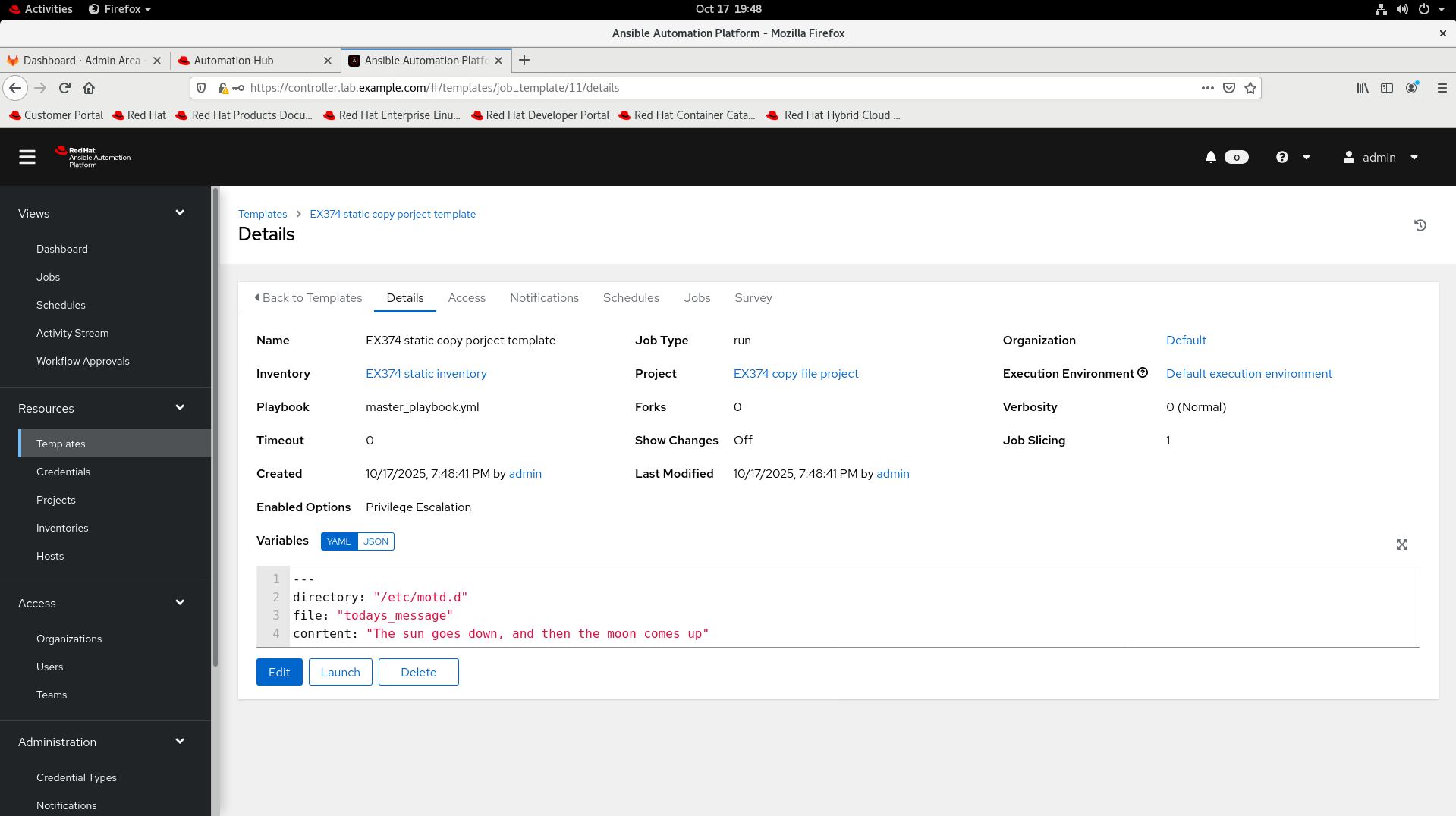
Template EX374 static copy porject template
When launched the template runs the playbook master_playbook.yml in project EX374 copy file project against hosts in inventory EX374 static inventory
Set the following variables in template EX374 static copy project template
---
directory: "/etc/motd.d"
file: "todays_message"
conrtent: "The sun goes down, and then the moon comes up"
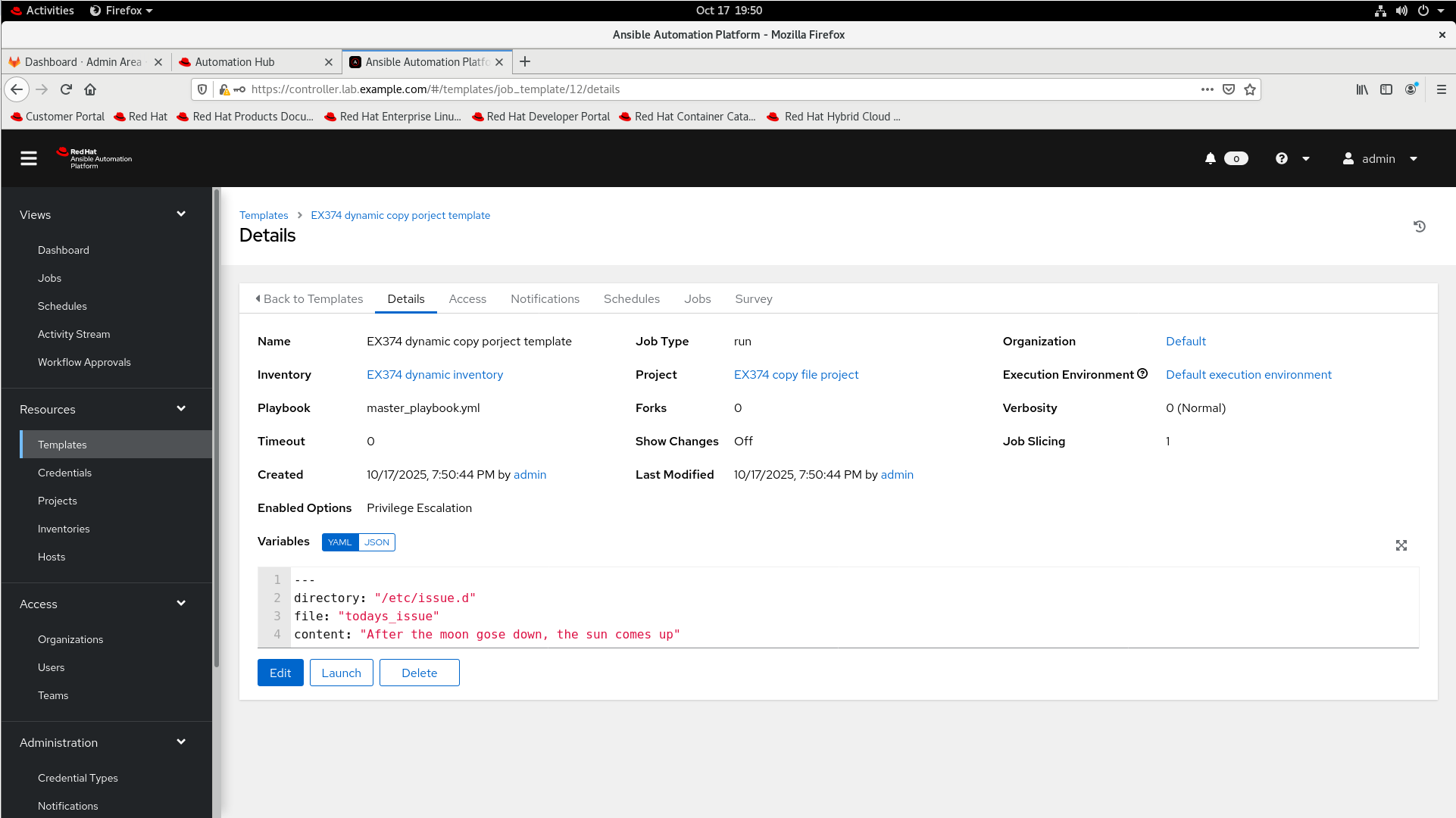
Template EX374 dynamic copy porject template
When launched the template runs the playbook master_playbook.yml in project EX374 copy file project against hosts in inventory EX374 dynamic inventory
Set the following variables in template EX374 dynamic copy project template
---
directory: "/etc/issue.d"
file: "todays_issue"
content: "After the moon gose down, the sun comes up"
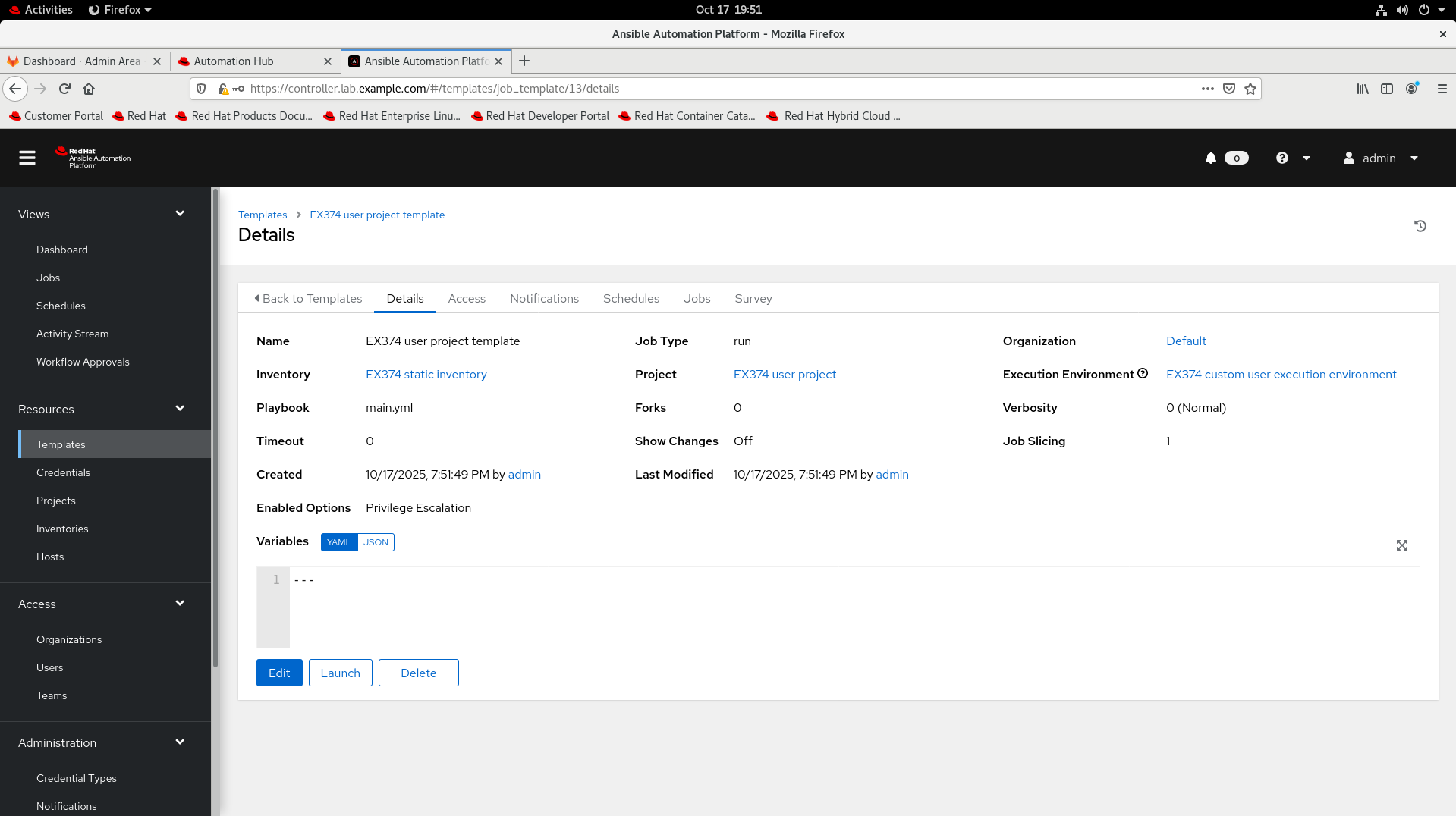
Template EX374 user project template
When launched the template runs the playbook main.yml in project EX374 user project against hosts in inventory EX374 static inventory
The template uses the EX374 custom user execution environment execution environment
答案
点击展开
第一小题
第二小题
第三小题
考试的时候,如果不创建machine credential 也可以运行,就不需要创建,如果不能运行,再去重新创建